
 iCreate issue 108 lands with a satisfying thump on the shelves of your local magazinical emporium today, and within its pages you’ll find a solid contribution from this writer – 10 pages, in fact. Page 44 kicks things off with my tutorial showing how to use the Vignette and Edge Blur tools in iPhoto, while over on page 56 you’ll find my 9-step guide to MIDI note editing in GarageBand.
Page 82 has a double-page spread revealing 10 iTunes secrets, and page 86 features another two pages exploring the features of CleanMyMac, an app that can help keep your hard drive free of space-hogging junk.
Finally, on page 106 is another two-pager detailing the iDesk diagram-creation app for the iPad. Quite a variety this month!
Tag Archives: how to
Massive Delay Feature Makes the Cover of Computer Music 179

Massive ‘GarageBand Made Easy’ Feature in iCreate 107


Elsewhere in the issue, there’s more great stuff about how to improve your Mac using upgrades and system add-ons, and more tutorials on iLife for iOS, Aperture and Final Cut Pro X.
Another MacUser GarageBand Tutorial Published
 It’s a nice problem to have, I guess, but I sometimes lose track of which article is coming out when in what magazine. The current issue of MacUser is a case in point, as it features a four-page GarageBand tutorial, starting on page 86, in which I demonstrate how to use the Musical Typing feature as a rudimentary sampler, create your own Apple Loops with the resulting instruments and thereby personalise and expand your Apple Loop library with your own custom sounds. So if you want to learn how this is done, get hold of a copy sharpish, as my lateness in getting this post up means that it’ll only be in the shops for another week or so!
iCreate Issue 106 Breaks Cover
 Another new issue of iCreate magazine hit the stores last week. Issue 106 contains a total of 6 pages from me, all in the shape of GarageBand and OS X tutorials.
Kicking off on page 48, I show you how to use GarageBand’s Groove Match feature to tighten up the timing of wayward audio and MIDI tracks. This is a really useful feature that can improve your project’s groove with a click of your mouse.
Elsewhere in the issue, page 74 features a tutorial for OS X Mail about how to tighten up your junk mail filter to prevent your inbox filling up with spam, while over on page 76 I demonstrate how to set up and use Mail’s Smart Mailbox feature, a really simple yet effective way of keeping your messages organised and easy to find.
Lots of other great stuff from the iCreate team in this issue too, including a definitive 16-page guide to the new iPad, an exploration of the new features found in Mountain Lion, and tutorials for iPhoto, iMovie and GarageBand for iOS.
Computer Music Issue 177 – 7 pages this month!


See ya later, arpeggiator
My main contribution to this issue is the Arp Attack! feature starting on page 42. Five pages of step-by-step tutorials on how to construct and use arpeggios, from creating them from scratch by hand in a piano roll editor to generating them with the purpose-built arpeggiators found in most DAWs. You’ll also find some audio examples on the cover DVD.
To see more, nip down to your newsagent and pick up a copy today!
How to Access OS X Lion’s Hidden User Library Folder
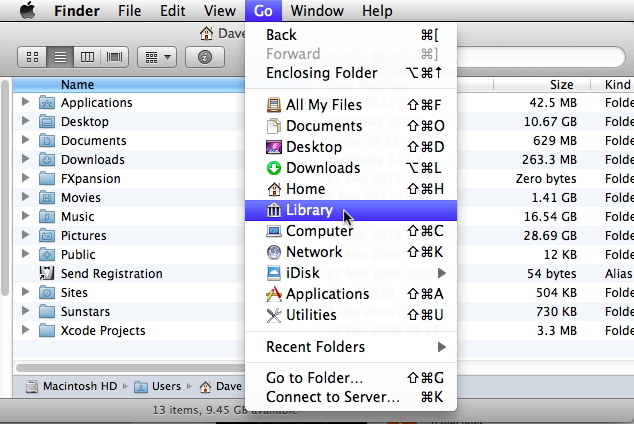 A bit of a geeky one this – although I’m not sure how that’s going to make it any different from all the other posts here – but I found a solution today for a Mac OS-based issue that’s been bugging me for a while now, ever since I upgraded to Lion. For some reason known only to themselves, Apple have decided to make the User library folder in OS X 10.7 invisible from the Finder. When you browse to Mac HD > Users > username and try to access the Library folder, it just isn’t there. It always used to be, but now it seems that Apple think that the average Mac user is far too stupid to be granted access to this particular folder. This can make things awkward if you want to do stuff like delete a rogue preference file, manually install an AU plug-in or access any of the Application Support folders contained therein.
Until this morning, this was only slightly irksome, but when I urgently needed to delete an unwanted file from the folder where my iWork templates are stored, it suddenly became an issue for which I had to go hunting for a solution. This turned out to be so surprisingly simple, while at the same time completely counter-intuitive, that I decided to post it here for anyone with a similar issue.
To access the hidden user library folder in OS X 10.7, here’s what you do.
1. Hold down your Mac’s Alt (Option) key.
2. In the Finder’s ‘Go’ menu, click ‘Library’
3. You’re in!
Notice that, if you release the Alt key while the ‘Go’ menu is open, the Library option disappears. Why we now have to jump through hoops to get to this particular bit of our hard drives is anybody’s guess, but you do have to wonder why Apple don’t let users know why they’ve done this, and how to get around it when you really need to.
Now I just need to find a way to rearrange the items in the Finder sidebar so I don’t have to scroll down to eject my external drive, and figure out why the Help browser always floats above all other open windows, no matter which app is in the foreground. Then my post-Lion life will be complete.
Home Recording Tips – How to Get a Great Vocal Sound

Recording Vocals with a Pop Shield
With many chart hits having been created in home studios with software such as Logic, GarageBand and Pro Tools, it’s never been a better time to be a bedroom producer. One of the biggest challenges when recording songs in a home studio environment is capturing a great-sounding vocal, so listed below are some tips to minimize the problems that can beset home recordists when attempting to capture that perfect take.
Read more at:
http://daveclews.suite101.com/home-recording—how-to-get-the-perfect-vocal-sound-a352632#ixzz1pljMq9hH
iCreate Issue 105 Out Today!
 It hardly seems like 4 weeks has gone by, yet here’s another issue of iCreate stuffed full of lovely stuff, and four pages of it is by me! I have two GarageBand tutorials this month, the first on combatting hiss in your recordings (hot on the heels of my Computer Music guide to audio restoration last month!). The second tutorial demonstrates an interesting and simple technique for breathing new life into your Apple Loop library, by reassigning different software instruments to your existing MIDI loops. All this, together with an in-depth guide to iCloud, introduction to OS X Mountain Lion, a look at iBooks Author and a host of other goodies make for another great issue from the team. Go get it!
How to Make a Videosong with iLife ’11 – MacUser Tutorial


iCreate Issue 104!


iCreate Issue 103 Out Now!
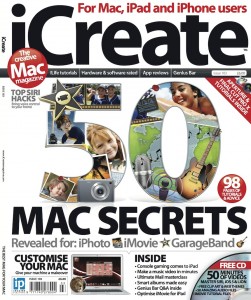 Good to see Imagine Publishing getting the year off to a cracking start with another feature-packed issue of iCreate magazine hitting the shelves this week. All the hours I put in before Christmas have resulted in a total of eight pages from me in this month’s issue. On page 40 you’ll find a 4-page mega-tutorial on how to use GarageBand to score your iMovie projects, while elsewhere in the issue I demonstrate how to customise the toolbar in Mac OS X’s Mail app and how to create your own Dashboard widgets using Safari webclips. All useful stuff, especially when combined with the brilliant cover feature detailing 50 secret tips for iLife. If you want to see more, get down to your newsagent or subscribe to the digital version via Newsstand.
Auto-Tune Guide Featured in Computer Music 173


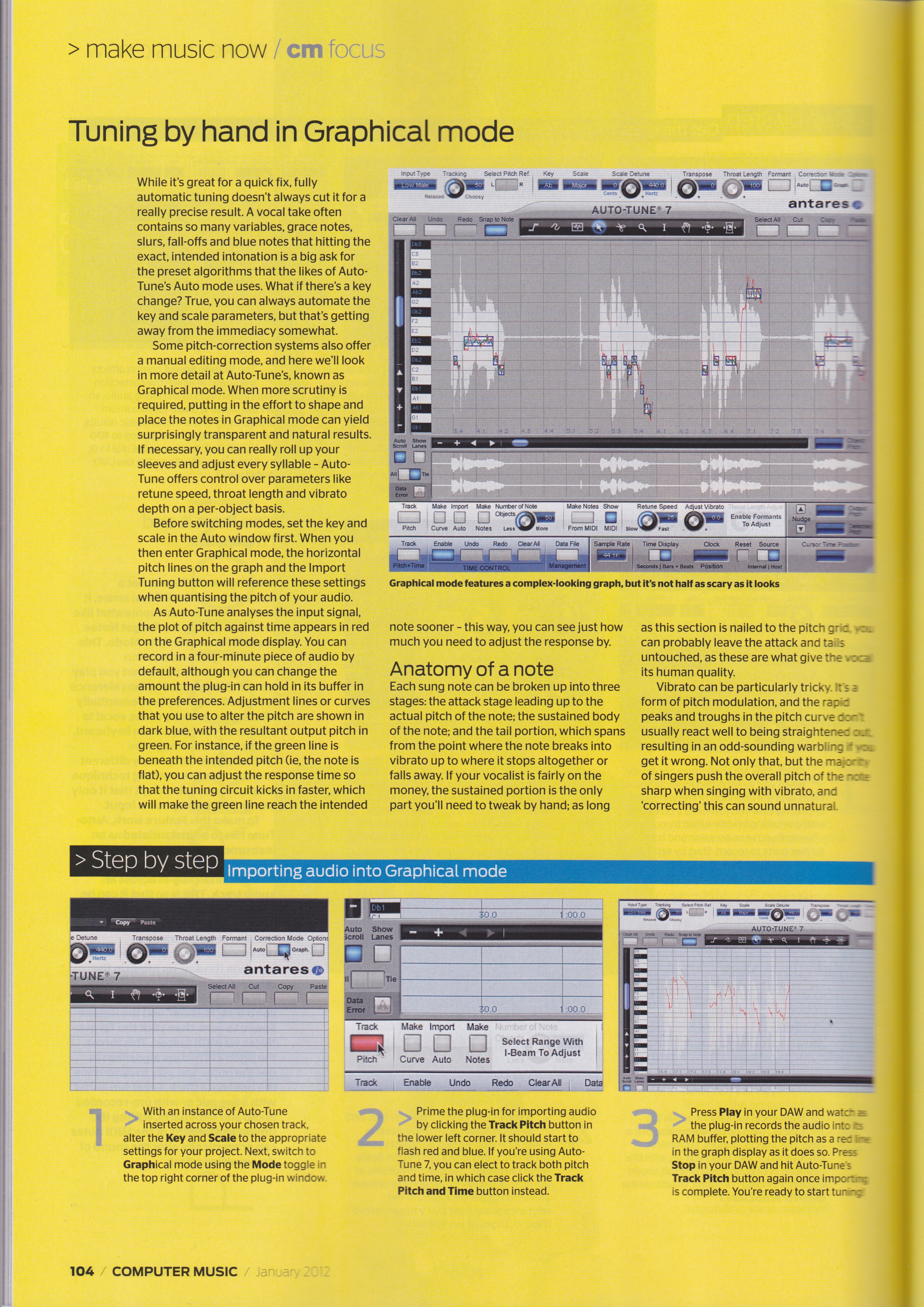
Fancy a few tips on how to use Auto-Tune? You could do a lot worse than pick up this month’s copy of Computer Music magazine, as it contains my 5-page tutorial feature on how to get the best out of Antares’ all-pervading pitch-correction plug-in. Comprehensive step-by-step guides show you how to use Auto mode for both robotic effects and natural-sounding tuning correction, how to import audio into Graphical mode, how to tune by hand with the Curve tool, how to adjust pitch with the Note tool, and how to deal with vibrato. Also shown is how to get the signature T-Pain / Kanye West sound using the budget EFX2 plug-in.
 daveclews.com