WWDC 2012 Highlights – New MacBooks, Mountain Lion, iOS 6 – UK Prices

Unlike last year, where I missed almost the entire thing due to deadline pressures, this time around I was fully poised with live weblogs engaged as the 6.00pm keynote hour for Apple’s Worldwide Developer Conference approached. Here’s a rundown of what was announced at the Moscone Centre in San Francisco earlier this evening.

Updated MacBook Pro and MacBook Air

The MacBook Air gets the new Intel Ivy Bridge processor, up to 2GHz dual-core i7, with up to 8GHz of 1600MHz RAM and 60% faster graphics. 512GB of flash storage, USB 3, and a 720p FaceTime camera. Display wise, the 11″ model sports a 1366 x 768 display, with a 1440 x 900 resolution on the 13″ . The 2012 MacBook Air ships today, with prices ranging from £849 – £1249.

The MacBook Pro also gets Ivy Bridge processors, up to 2.9GHz quad-core i7, (turbo boostable to 3.6GHz), 8GB of 1600MHz RAM and 60% faster graphics. The 13″ model gets the same integrated graphics chip as the new MacBook Air, while the 15″ gets the Kepler GeForce GT 650M graphics card with up to 1GB of video RAM. Both models get USB 3 ports. The 13″ version starts at £999 for the 2.5GHz variant, rising to £1249 for the 2.9GHz i7. The 15″ model starts at £1499 for the 2.3GHz, going up to Continue reading

iCreate 108 Is Out!

iCreate issue 108 lands with a satisfying thump on the shelves of your local magazinical emporium today, and within its pages you’ll find a solid contribution from this writer – 10 pages, in fact. Page 44 kicks things off with my tutorial showing how to use the Vignette and Edge Blur tools in iPhoto, while over on page 56 you’ll find my 9-step guide to MIDI note editing in GarageBand.
Page 82
has a double-page spread revealing 10 iTunes secrets, and page 86 features another two pages exploring the features of CleanMyMac, an app that can help keep your hard drive free of space-hogging junk.
Finally, on page 106 is another two-pager detailing the iDesk diagram-creation app for the iPad. Quite a variety this month!

Novation Impulse 49 Review – Computer Music 179

In all the excitement over my cover feature this issue (see below), I almost forgot about my review of the Novation Impulse 49 Controller Keyboard that also appears in this month’s issue. The mid-range, mid-size all-rounder from the highly-regarded chaps at Novation combines with their AutoMap 4 software to provide a compelling package for those who need hardware control of third-party plug-ins with added on-board arpeggiation and a semi-weighted keyboard with polyphonic aftertouch. To read the full review and what I really thought of the unit, catch the new issue of Computer Music that hits the shelves today.

Massive Delay Feature Makes the Cover of Computer Music 179

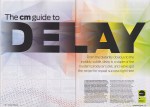
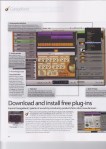
They say that as you get older, your features get bigger. Well, that definitely seems to be true in my case at the moment, as hitting the shelves today is issue 179 of Computer Music, which contains my truly enormous, 12-page guide to using delay effects. Bristling with techniques and walkthroughs, many of which are backed up by video tutorial files on the cover disc, this comprehensive guide to one of the most useful effects in music follows hot on the heels of my recent 11-page GarageBand feature for iCreate, setting a new personal best for me in terms of page quantity. I’m really excited to see this in print, as it took almost two weeks to produce and is my biggest commission yet. So don’t delay – get down to the newsagents and pick up a copy, or order the digital edition online today!

Massive ‘GarageBand Made Easy’ Feature in iCreate 107

iCreate issue 107 hits the shelves in the next day or so, and I’m proud to reveal that it contains my biggest feature yet – a huge nineteen-page introduction to the world of GarageBand, explaining everything from how the interface works, what templates to select, how to write your first song, how to record your own performances, how to compose a song using just Apple Loops and how to use the software to score an iMovie project. This is the biggest feature I’ve done in 5 years of writing, and it’s a belter! If you’ve ever had any inclination to get started with GarageBand, everything you need is right here, starting from page 24.
Elsewhere in the issue, there’s more great stuff about how to improve your Mac using upgrades and system add-ons, and more tutorials on iLife for iOS, Aperture and Final Cut Pro X.

Computer Music 178 – full of Clews Reviews

A bit slow on the uptake with this one as well, as it actually hit the shelves a few days ago. I’ve had such a full-on few days recently that I’d actually forgotten that I’d submitted two reviews for this issue! My attention turned to software this time around, notably Audioease’s remarkable Altiverb 7 Convolution Reverb, with the power to place you sonically in a wide range of desirable acoustic spaces from around the world, and Sonokinetic’s Vivace Rompler, a giant 20GB repository of cinematic orchestral ambiences and textures. To see what I thought of them both, nip down to Smith’s, Tesco’s or any half-decent newsagent and pick up a copy. Then pay for it. Take it home. You know how it works.

Another MacUser GarageBand Tutorial Published

It’s a nice problem to have, I guess, but I sometimes lose track of which article is coming out when in what magazine. The current issue of MacUser is a case in point, as it features a four-page GarageBand tutorial, starting on page 86, in which I demonstrate how to use the Musical Typing feature as a rudimentary sampler, create your own Apple Loops with the resulting instruments and thereby personalise and expand your Apple Loop library with your own custom sounds. So if you want to learn how this is done, get hold of a copy sharpish, as my lateness in getting this post up means that it’ll only be in the shops for another week or so!

iCreate Issue 106 Breaks Cover

Another new issue of iCreate magazine hit the stores last week. Issue 106 contains a total of 6 pages from me, all in the shape of GarageBand and OS X tutorials.
Kicking off on page 48, I show you how to use GarageBand’s Groove Match feature to tighten up the timing of wayward audio and MIDI tracks. This is a really useful feature that can improve your project’s groove with a click of your mouse.
Elsewhere in the issue, page 74 features a tutorial for OS X Mail about how to tighten up your junk mail filter to prevent your inbox filling up with spam, while over on page 76 I demonstrate how to set up and use Mail’s Smart Mailbox feature, a really simple yet effective way of keeping your messages organised and easy to find.
Lots of other great stuff from the iCreate team in this issue too, including a definitive 16-page guide to the new iPad, an exploration of the new features found in Mountain Lion, and tutorials for iPhoto, iMovie and GarageBand for iOS.

Computer Music Issue 177 – 7 pages this month!

The latest issue of Computer Music magazine, issue 177, hit the shelves earlier this week, and in this one I’ve managed a personal best total of 7 pages. Two of them are the aforementioned review of Steinberg’s awesome Cubase 6.5 DAW package. As a Cubase user from the old school, I had a great time getting re-acquainted with this latest version. It was a bit like catching up with an old friend after 10 years’ not speaking to find that they’d taken up bodybuilding, had three facelifts and a hair transplant. To find out how we got on, check out the review on page 84.

See ya later, arpeggiator
My main contribution to this issue is the Arp Attack! feature starting on page 42. Five pages of step-by-step tutorials on how to construct and use arpeggios, from creating them from scratch by hand in a piano roll editor to generating them with the purpose-built arpeggiators found in most DAWs. You’ll also find some audio examples on the cover DVD.
To see more, nip down to your newsagent and pick up a copy today!

Great New Musical Talent – Lucy Hirst (aka Polkadothaze)

Yesterday marked the YouTube debut of a truly remarkable musical talent. Lucy Hirst, aka Polkadothaze, at the age of only seventeen, manages to fuse angelic vocals and beautiful melodies with truly heartfelt lyrics that show a maturity beyond her years, and that will strike a chord with fellow teens everywhere. I have a feeling that this could be the start of something big, so if you love this song as much as I do, please do support her, like and subscribe to her channel, and expect more tunes soon!

iCreate Issue 105 Out Today!

It hardly seems like 4 weeks has gone by, yet here’s another issue of iCreate stuffed full of lovely stuff, and four pages of it is by me! I have two GarageBand tutorials this month, the first on combatting hiss in your recordings (hot on the heels of my Computer Music guide to audio restoration last month!). The second tutorial demonstrates an interesting and simple technique for breathing new life into your Apple Loop library, by reassigning different software instruments to your existing MIDI loops. All this, together with an in-depth guide to iCloud, introduction to OS X Mountain Lion, a look at iBooks Author and a host of other goodies make for another great issue from the team. Go get it!

New iPad / iPad 3 – UK Prices

Just a quick update to yesterday’s new iPad announcement. Official UK prices for the new iPad are as shown in the image, starting at £399 for the base 16GB WiFi-only model and rising to £659 for the top-of-the-range 64GB WiFi + 4G version. Details of data plans for the 4G models, and their associated costs, can be found at http://store.apple.com/uk/browse/home/shop_ipad/family/ipad/select_ipad

Apple Unveils not the iPad 3, but the New iPad

Apple have at last thrown the wraps off the new iPad at a press event in San Francisco today. Bucking the trend for numerical updates, they’ve gone, not with ‘iPad 3’ as was expected, or even the rumoured ‘iPad HD’, but simply with the ‘New iPad’. The biggest physical difference from its predecessor seems to be a Retina display at a whopping 2048 x 1536 resolution, the new version containing 3.1 million pixels, the most ever in a mobile device. This works out at 264 pixels per inch, more than four times the resolution of the iPad 2, and with 44% better colour saturation, this promises to be a pretty amazing screen.
The new device is powered by an Apple A5X processor, with quad core graphics, promising double the performance of the A5 chip found in the previous model.
The rearward-facing iSight camera sports a 5-megapixel backside illuminated sensor, 5-element lens, IR filter, and can shoot 1080p HD video with image stabilization. The camera also sports auto exposure, auto focus and face detection capability.
Other new features include Voice Dictation via a microphone key on the software keyboard and support for 4G LTE networks – basically the next generation of wireless mobile broadband, which has yet to appear in the UK but is expected to be rolled out sometime this year.
The new unit is 9.4mm thick and weighs in at 1.4lbs – slightly heavier than the iPad 2. Battery life remains at a quoted 10 hours, and it ships with iOS 5.1, which Apple also released today. Pricing is the same as for the old model, while schools, colleges and thrifty people will be delighted to note that the iPad 2 will continued to be sold for $100 less than the base model of the new version.

WiFi
16GB $499
32GB $599
64GB $699

WiFi + 4G
16GB $629
32GB $729
64GB $829.

Available, as before, in black or white finish, the new iPad’s release date is March 16th in the US, Canada, UK, France, Germany, Switzerland and Japan, with 25 more countries joining in the fray on March 23rd. To accompany the new version of iOS, all the iWork and iLife iOS apps have been updated, with the much-anticipated iPhoto for iOS also making an auspicious debut to complete the lineup.

Griffin launches StudioConnect iPad Audio/MIDI Interface / Dock

iPad musicians sit up and take notice: The stylish Griffin StudioConnect gives your iPad audio in/out, MIDI in/out, and a stereo headphone jack. Coupled with a nifty integrated dock that gives your iPad a stable and convenient place to sit and charge up while you’re recording, this device looks like the ideal solution for capturing those fleeting musical ideas while on the move.
You can plug a guitar into the StudioConnect’s mono 1/4″ instrument jack and play directly into GarageBand or other music recording apps. Or plug a recorder or mixer into the StudioConnect’s stereo 3.5mm input jack and connect the whole band to your iPad.
Line-level stereo audio-out comes via rear-mounted left and right channel RCA outputs, while the front panel sports a separate front-panel 3.5 mm stereo headphone jack with its own volume knob. Standard 5-pin MIDI In and Out ports complete the lineup, together with a socket for an external power supply. With an RRP of $149.99 USD, the best part is, it works with both the iPad and the iPad2 (and presumably the iPad3 when it arrives later this month!)
Can it give the slightly more expensive and more fully-featured Alesis IO Dock a run for its money? Only time will tell…

Steinberg Releases Cubase 6.5

German sequencer kings Steinberg yesterday announced a sizeable update to their flagship Cubase Digital Audio Workstation software. Incorporating two substantial and impressive-looking new software synths (Retrologue and Padshop), new plug-ins (DJ EQ and MorphFilter), new comping and warping tools, FLAC file format support and an update to the VST Amp Rack guitar amp emulation system, Cubase 6.5 also includes 64-bit support and the ability to export mixes directly to SoundCloud. It’s available as a £43 upgrade from previous versions of Cubase, or can be purchased outright for a shade over £500. For more info on what’s new, check out http://www.steinberg.net/en/products/cubase/new_features/new_in_version_65.html#c141007
I’m a big fan of the original Cubase as it appeared on the Atari in the early 90’s, and I’ve never since found a sequencer that has surpassed it in terms of breadth of features and ease of use – and I’ve tried just about everything out there over the years.
I’ve been asked by Computer Music magazine to review this newest release over the weekend, so I’m really looking forward to putting this latest version of my old friend through its paces. Will it be like slipping on an old pair of shoes with new soles and laces? Or will I get bunions and blisters within the first few hours? Watch this space…

How to Make a Videosong with iLife ’11 – MacUser Tutorial

Videosongs are home-made music videos where you record both audio and video of your performance, then edit it together so that what you hear is also what you see. They’re a fantastic and fun way to show off your musical talents to the world at large, and as promised in an earlier post, the 6-page videosong tutorial I was working on in January appears in this fortnight’s issue of MacUser magazine. In a massive 28-step guide on how to record, edit and share a complete multitrack audio and split-screen video performance, I take you step by step through the process from start to finish, using only a camcorder or iPhone 4, together with the GarageBand and iMovie software that comes free with every new Mac. So if you fancy getting stuck into a rewarding and entertaining creative project, why not nip down to Smiths this afternoon and pick up a copy of the mag?

Guide to Audio Restoration – Computer Music Issue 175

Ever wanted to get rid of an annoying hum or tape hiss from an audio recording? My 5-page feature tutorial “Taking the Hiss” on page 48 of this month’s issue of Computer Music magazine turns the spotlight on what’s possible with the latest audio restoration software. Logic, ProTools, iZotope’s amazing RX2 and Adobe Audition are all featured, along with an amazing piece of software called Photosounder that literally turns sound into images so that you can edit out unwanted noises using image editing software like Photoshop, then turn the doctored image back into sound again, without the noise… incredible stuff! With audio examples for all the step-by-step guides included on the cover DVD, if you’ve ever been troubled by crackles, pops, squeaky chairs, coughs or burps (sounds like the average morning around the breakfast table in our house), this is your comprehensive guide to noise removal using noise profiling, spectral editing, even a pencil tool. As ever, there’s lots of other great stuff in the mag too, so check out Computer Music 175 in all good newsagents – now!

iCreate Issue 104!

Another issue of iCreate rolls off the presses and into your local news emporia this week, and I have a total of eight pages of tutorial stuff in this month’s issue, evenly split between OS X and GarageBand topics. In keeping with the issue’s main theme of WiFi networking, I show you how to share both a wired internet connection and another computer’s optical drive across a wireless network. Elsewhere, on a musical tip, I focus on using free AudioUnit plug-ins from third-party manufacturers in GarageBand, rounding off with a couple of pages covering how to master your tracks once you’ve finished recording and mixing them.

iCreate Issue 103 Out Now!

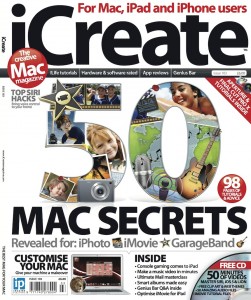
Good to see Imagine Publishing getting the year off to a cracking start with another feature-packed issue of iCreate magazine hitting the shelves this week. All the hours I put in before Christmas have resulted in a total of eight pages from me in this month’s issue. On page 40 you’ll find a 4-page mega-tutorial on how to use GarageBand to score your iMovie projects, while elsewhere in the issue I demonstrate how to customise the toolbar in Mac OS X’s Mail app and how to create your own Dashboard widgets using Safari webclips. All useful stuff, especially when combined with the brilliant cover feature detailing 50 secret tips for iLife. If you want to see more, get down to your newsagent or subscribe to the digital version via Newsstand.

More MacUser Column Inches

Happy New Year everyone!

After a hugely enjoyable Christmas break for both me and my trusty MacBook, I’ve hit the ground running with a short contribution to the cover feature in the current issue of MacUser magazine. The feature deals with broadening your creative horizons by expanding your Mac skillset into other areas, such as video, CGI, photography, web design or app development. I was chuffed to be asked to contribute to the Music section, and you’ll find the results on page 48 of the 6th January 2012 issue.
The first working week of this year has also been taken up with work on an exciting 6-page feature for another upcoming MacUser issue – watch this space for more details later this month!