Computer Music 191 – Classic Keys Cover Feature (with Video) plus KR-Delay CM & VPS Philta CM

Computer Music 191 – Classic Keys Cover Feature (with Video) plus KR-Delay CM & VPS Philta CM

CM191 Cover 500

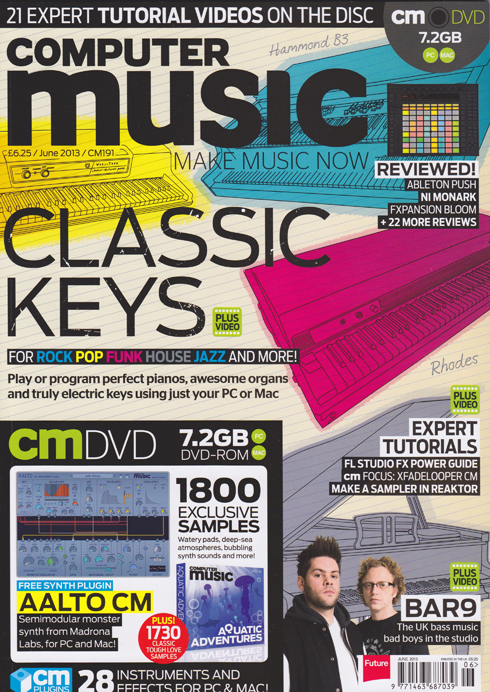
Huge excitement today as my massive, 13-page ‘Classic Keys’ cover feature hits the shelves at last on the front of Computer Music’s June 2013 issue. Beginning on page 32, it’s all about how to get the best from today’s finest virtual keyboard instruments and create convincing piano, electric piano and organ parts using your computer.

Covering:
• How real pianos, electric pianos and tonewheel organs work.
• How to recreate certain playing styles in a MIDI sequencer
• Programming dance piano chords
• Programming convincing sustain pedal performance data
• Using drawbars on a virtual Hammond B3
• How to choose the best virtual piano, Rhodes & organ plug-ins
And much more besides.

Every walkthrough guide also has an accompanying video on the cover DVD (or downloadable from the website via the digital editions). I’ve been dying to see this in print since I wrote it back in January, so if you want to get sounds like the likes of Stevie Wonder, Jimmy Smith, Billy Joel, Supertramp and other classic keyboard wizards into your tunes, grab a copy and check it out!

As a bonus, elsewhere in the issue, starting on page 16 I also take the helm of the regular ‘cm plug-ins Quick Guide‘ slot. Two pages each cover how to navigate your way around the front panels of KResearch’s KR-Delay CM stereo delay unit and Vengeance-Sound’s Philta CM superb dual filter plug-in. Both these special edition plug-ins are only available with the magazine, along with an ever-growing stable of other high-quality virtual instruments and effects.

17 pages in one issue – I think that might be a new personal best…… at least until next month’s issue!

MacUser Vol. 29 No.5 – Computer-Generated Vocals in GarageBand

MacUser Vol. 29 No.5 – Computer-Generated Vocals in GarageBand

MacUser 2905 Cover 500One Thursday night back in 1978, when I was 10 and first really getting into music, I witnessed a band on Top of the Pops called ELO playing a song called Mr Blue Sky. The middle 8 came in with its vocoded vocal and my pre-adolescent mind was instantly blown. Vocoders have been one of my favourite things on the planet ever since, and it’s long been a mild frustration of mine that GarageBand, a piece of software that I know and love well through my monthly iCreate tutorials, has not had the ability to produce a decent vocoded vocal. So, I made it my personal mission to try and perfect a technique that would not only make this possible, but that would produce great-sounding and properly useful results.
Yes, in the May 2013 issue of the new-look, bigger, monthly MacUser magazine, I take up six whole pages of the posh, shiny new paper with a step-by-step guide to producing coherent, computer-generated vocals in GarageBand without a vocalist or microphone anywhere in sight. It’s all thanks to one particular freeware third-party plug-in that happens to function in such a way that GarageBand’s lack of signal routing options no longer poses a problem to cash-strapped would-be vocoderists.
Beginning on page 78, this colourful and informative guide takes you through the entire process from scratch, starting by generating the source vocal as spoken text and ending up with a finished lead or backing vocal generated entirely within your Mac.
So if you’re a GB user who fancies a bit of vocoding fun (and it’s great fun, trust me!), get your May 2013 copy of MacUser today!

iCreate 119 – GarageBand Ringtones & Logic Editing Tips

iCreate 119 – GarageBand Ringtones & Logic Editing Tips

iCreate 119 Cover 500The latest issue of iCreate can now be glimpsed on a newsstand near you, be it analogue or digital, and if you flick through it you’ll find a few contributions in there from me. I get a couple of half-page mini-tutorials in the ‘How to Record an Album in a Week’ feature that begins on page 30. Page 33 features an item on how to work with MIDI drums in Logic’s piano roll editor, while on page 37 you’ll find some advice on the tools that Logic provides to get better results when recording and editing vocals.

Meanwhile, in a separate double-page tutorial on page 58, I demonstrate how to use GarageBand to create a custom iPhone ringtone from practically any piece of audio.

Aside from the ‘Album in a Week’ feature which is chock full of great advice and tips, there’s also a huge guide to how to get the best from iCloud, which I know I found extremely useful, along with the usual awesome collection of hints, tips, features and reviews.
So if you haven’t already, add issue 119 to your collection forthwith!

Avid Announce Pro Tools 11 at NAB 2013

Avid Announce Pro Tools 11 at NAB 2013

Pro Tools 11

One of the most exciting news items to come out of the NAB show in Las Vegas this week has been Avid’s announcement of the all-new Pro Tools 11. A completely rewritten, 64-bit application with all-new code and a brand new Avid Audio Engine (bye, DAE!) under the bonnet, this audio and music production, editing and mixing powerhouse takes things up to the next level, with the promise of more processing power, more tracks, more virtual instruments, more complex instruments – just more, basically. The 64-bit architecture promises better memory management, with the ability to address as much RAM as your computer can hold, and all-round much slicker performance, particularly in complex sessions with lots of virtual instruments and effects. But, apart from being 64-bit from the ground up, what else is new? Has someone at Avid been listening? Has all the stuff that’s driven us PT users nuts for years finally been addressed? Here’s a closer look at some of the new bits and pieces to be found in Pro Tools 11.

Offline Bouncing
Offline bouncing is here at last, which will have many users literally jumping for joy. The days of watching the progress bar crawl across the screen as the computer wrestles with a real-time bounce of a complex orchestral mix or an hour-long podcast, (only to throw up an error at the last minute, requiring the whole process to be started again through a blurry veil of frustrated tears) are finally drawing to a close. Offline bouncing promises to deliver mixes at speeds up to 150 times faster, which means an hour-long program could be rendered in under one minute. This is sample-accurate offline bouncing to boot, so you always know exactly what you’ll end up with. Stem creation looks like it’s about to get a lot less painful, and it looks likely to be useful as a track freeze function too, a quick way of lightening the CPU load caused by memory-hogging virtual instrument tracks. You can also bounce a .WAV and a .mp3 version simultaneously in PT11.

Timing Tweaks
Elsewhere, Avid have sought to stamp out latency issues by implementing both an input and an output buffer, so that  delays introduced by complex processes can be compensated for at the output stage. This all happens transparently, so that by the time it reaches your ears, everything should be in perfect time. To reduce monitor latency when recording, PT 11 has domain latency switching which allows for input-enabled virtual instrument and record channels to employ a super-low, 32-sample buffer while playback tracks operate at whatever your current system buffer settings are. Clever!
Time-stamped plugin parameter automation means that now every automation move will happen exactly when it’s supposed to, rather than a few frames either side of the intended position, which can apparently happen with some current systems when a bounce is rendered.

From Meter You
Pro Tools 11 introduces a batch of new metering systems for Pro Tools HD users – a total of 17 industry-standard metering options are available in the top-end version of the software, including standard VU metering, BBC and Nordic PPM metering, and even Bob Katz’ K System. The master track meters can have their format set independently from the rest of the Mix window, and mini meters now appear on the plugin slots in the Sends view. You’ll also now find a configurable gain reduction meter for dynamics plugins on each channel in the HD version. The channel meters themselves are much higher resolution and also 30% taller than those in PT10.

Video Star
Video handling is also much improved, with Pro Tools 11 adopting the same video engine as that found in its sister app Media Composer, which was also updated this week. You can now monitor and even edit HD video directly within your Pro Tools sessions. You can add a variety of broadcast level formats (XD Cam, MXF HD, Avid DNxHD) directly to your session without transcoding, which is a real timesaver. There’s also improved support for a much wider range of video interfaces than before, including equipment from AJA and Black Magic.

Bits n Bobs
There’s a host of other tweaks and enhancements alongside the big guns. Dynamic Host Processing cleverly reallocates processor resources away from tracks when there’s nothing playing on them. There’s an updated workspace browser with a faster, improved search feature, and you can now input automation data whilst recording – great for recording live sound. This automation data can also be converted to clip gain when mixing a project.
There’s a set of new, single-handed shortcuts for bypassing inserts – great for quick before / after comparisons of channel strips with long plugin chains. You can bypass all inserts with one keystroke (Shift +A), or use different commands to bypass by placement or category. Graphically, the system now supports Apple’s Retina displays and there have been some visual tweaks to the Mix window.

Notably, PT11 only supports the AAX plugin format – RTAS & TDM plugins are no longer supported from this version onwards because they are all 32-bit code. PT11 is all 64-bit code, so older plugins may need to be sacrificed for the sake of progress, at least until AAX upgrades of those plugins become available. A tough call for UAD users. Interestingly, you can run both PT10 & PT11 on the same machine, which offers a temporary workaround to bridge the transition, but if you’re a Mac Pro user, that machine has to be newer than the March 2009 (Mac Pro 4,1) model. Pro Tools 11 requires OS X 10.8.3 or newer, and an iLok2 USB dongle is required for copy protection.

So, no new plugins or instruments then, but rather a completely overhauled application that promises to provide a smoother and faster workflow, as long as you can take the ‘no RTAS’ hit. Pro Tools 11 is expected to ship in May / June 2013, but anyone who purchases and registers a copy of PT10 between 7th April and the release date will receive a free upgrade to 11 when it ships.

Pricing
Pricing will be as follows:

Pro Tools 11 software (full version)— $699 USD
Pro Tools 10 to 11 upgrade— $299 USD
Pro Tools 9 to 11 upgrade— $399 USD
Pro Tools Express to Pro Tools 11 cross grade— $499 USD
Pro Tools HD 10 to 11 upgrade— $599 USD
Pro Tools HD 9 to 11 upgrade— $999 USD

For more information, see http://apps.avid.com/protools11

Working with Cubase 7’s MixConsole (Video) – Computer Music 188

Working with Cubase 7’s MixConsole (Video) – Computer Music 188

Cubase 7 MixConsole Vid Here’s a link to one of the videos I created for the Cubase 7 New Features guide that appeared a couple of months back in Computer Music issue 188.

It takes an in-depth look at the revamped MixConsole, focusing on the redesigned layout, new Q-Link button, channel search feature, channel strip modules and more. Check it out and let me know what you think!

Computer Music 190 – HorNet Fat-Fet & LinPlug CM-505

Computer Music 190 – HorNet Fat-Fet & LinPlug CM-505

CM190 Cover 500Computer Music magazine hits the shelves with a particularly high-viz cover this month, and all of my bits and pieces can be found near the front of the issue this time around. In the DVD Tutorial section, I get to introduce you to this month’s free plug-in, the excellent HorNet Fat-Fet. This virtual analogue compressor plug-in is modelled on the famous Universal Audio 1176LN Blue Stripe hardware compressor from 1967, and even though the front panel bears no resemblance to the original, it sounds pretty great. You’ll find a full description and in-depth 18-step guide to how to use it on pages 6-8, together with an accompanying video on the cover DVD.

Elsewhere, the CM Plugins Quick Guide feature delves into the innards of the LinPlug CM-505, an exclusive, custom-built analogue drum synth offered as part of the free suite of plugins that comes bundled with each issue of cm. A detailed four-page breakdown of what all the knobs and buttons do, this is the first time I’ve had a go at this kind of feature, and you can see how it turned out on pages 16-19.

So don your shades and get stuck into CM190, available from today in both print and download editions.