
 Another new issue of iCreate magazine hit the stores last week. Issue 106 contains a total of 6 pages from me, all in the shape of GarageBand and OS X tutorials.
Kicking off on page 48, I show you how to use GarageBand’s Groove Match feature to tighten up the timing of wayward audio and MIDI tracks. This is a really useful feature that can improve your project’s groove with a click of your mouse.
Elsewhere in the issue, page 74 features a tutorial for OS X Mail about how to tighten up your junk mail filter to prevent your inbox filling up with spam, while over on page 76 I demonstrate how to set up and use Mail’s Smart Mailbox feature, a really simple yet effective way of keeping your messages organised and easy to find.
Lots of other great stuff from the iCreate team in this issue too, including a definitive 16-page guide to the new iPad, an exploration of the new features found in Mountain Lion, and tutorials for iPhoto, iMovie and GarageBand for iOS.
The Answer Is Yes – Videosong Collaboration with Polkadothaze
This is the first in what will hopefully turn out to be a series of videosong collaborations with the uber-talented Lucy Hirst (aka Polkadothaze).
For those interested, the video for this was all shot between Christmas 2011 and January 2012 using an iPhone 4, which also handled most of the audio recording due to the lack of a proper microphone. It came about while I was researching a tutorial article for MacUser magazine on how to make videosongs on your Mac – I figured that the best way to research the topic was to actually make a videosong of my own!
The track was put together in GarageBand and the video was edited in Adobe Premiere Pro, largely because of iMovie’s limited split-screen effects capabilities. Luckily for me, the leg-slapping was achieved in one take, so no major bruising was suffered! The article was eventually published on page 84 of the 17 Feb 2012 issue of MacUser (Vol.28, No.4). (See post below). Check it out if you want to find out how the video was done.
If you like how it turned out, please do like the vid on YouTube and subscribe to Lucy’s channel, as there’ll hopefully be more songs from this amazing new talent appearing soon.
Computer Music Issue 177 – 7 pages this month!


See ya later, arpeggiator
My main contribution to this issue is the Arp Attack! feature starting on page 42. Five pages of step-by-step tutorials on how to construct and use arpeggios, from creating them from scratch by hand in a piano roll editor to generating them with the purpose-built arpeggiators found in most DAWs. You’ll also find some audio examples on the cover DVD.
To see more, nip down to your newsagent and pick up a copy today!
Great New Musical Talent – Lucy Hirst (aka Polkadothaze)
 Yesterday marked the YouTube debut of a truly remarkable musical talent. Lucy Hirst, aka Polkadothaze, at the age of only seventeen, manages to fuse angelic vocals and beautiful melodies with truly heartfelt lyrics that show a maturity beyond her years, and that will strike a chord with fellow teens everywhere. I have a feeling that this could be the start of something big, so if you love this song as much as I do, please do support her, like and subscribe to her channel, and expect more tunes soon!
How to Access OS X Lion’s Hidden User Library Folder
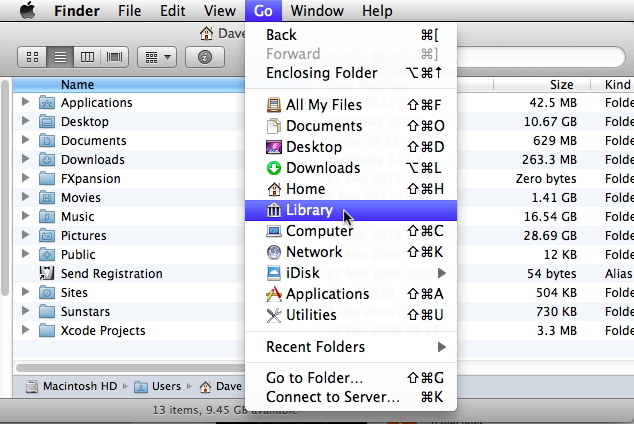 A bit of a geeky one this – although I’m not sure how that’s going to make it any different from all the other posts here – but I found a solution today for a Mac OS-based issue that’s been bugging me for a while now, ever since I upgraded to Lion. For some reason known only to themselves, Apple have decided to make the User library folder in OS X 10.7 invisible from the Finder. When you browse to Mac HD > Users > username and try to access the Library folder, it just isn’t there. It always used to be, but now it seems that Apple think that the average Mac user is far too stupid to be granted access to this particular folder. This can make things awkward if you want to do stuff like delete a rogue preference file, manually install an AU plug-in or access any of the Application Support folders contained therein.
Until this morning, this was only slightly irksome, but when I urgently needed to delete an unwanted file from the folder where my iWork templates are stored, it suddenly became an issue for which I had to go hunting for a solution. This turned out to be so surprisingly simple, while at the same time completely counter-intuitive, that I decided to post it here for anyone with a similar issue.
To access the hidden user library folder in OS X 10.7, here’s what you do.
1. Hold down your Mac’s Alt (Option) key.
2. In the Finder’s ‘Go’ menu, click ‘Library’
3. You’re in!
Notice that, if you release the Alt key while the ‘Go’ menu is open, the Library option disappears. Why we now have to jump through hoops to get to this particular bit of our hard drives is anybody’s guess, but you do have to wonder why Apple don’t let users know why they’ve done this, and how to get around it when you really need to.
Now I just need to find a way to rearrange the items in the Finder sidebar so I don’t have to scroll down to eject my external drive, and figure out why the Help browser always floats above all other open windows, no matter which app is in the foreground. Then my post-Lion life will be complete.
Home Recording Tips – How to Get a Great Vocal Sound

Recording Vocals with a Pop Shield
With many chart hits having been created in home studios with software such as Logic, GarageBand and Pro Tools, it’s never been a better time to be a bedroom producer. One of the biggest challenges when recording songs in a home studio environment is capturing a great-sounding vocal, so listed below are some tips to minimize the problems that can beset home recordists when attempting to capture that perfect take.
Read more at:
http://daveclews.suite101.com/home-recording—how-to-get-the-perfect-vocal-sound-a352632#ixzz1pljMq9hH
iCreate Issue 105 Out Today!
 It hardly seems like 4 weeks has gone by, yet here’s another issue of iCreate stuffed full of lovely stuff, and four pages of it is by me! I have two GarageBand tutorials this month, the first on combatting hiss in your recordings (hot on the heels of my Computer Music guide to audio restoration last month!). The second tutorial demonstrates an interesting and simple technique for breathing new life into your Apple Loop library, by reassigning different software instruments to your existing MIDI loops. All this, together with an in-depth guide to iCloud, introduction to OS X Mountain Lion, a look at iBooks Author and a host of other goodies make for another great issue from the team. Go get it!
New iPad / iPad 3 – UK Prices
 Just a quick update to yesterday’s new iPad announcement. Official UK prices for the new iPad are as shown in the image, starting at £399 for the base 16GB WiFi-only model and rising to £659 for the top-of-the-range 64GB WiFi + 4G version. Details of data plans for the 4G models, and their associated costs, can be found at http://store.apple.com/uk/browse/home/shop_ipad/family/ipad/select_ipad
Apple Unveils not the iPad 3, but the New iPad
 Apple have at last thrown the wraps off the new iPad at a press event in San Francisco today. Bucking the trend for numerical updates, they’ve gone, not with ‘iPad 3’ as was expected, or even the rumoured ‘iPad HD’, but simply with the ‘New iPad’. The biggest physical difference from its predecessor seems to be a Retina display at a whopping 2048 x 1536 resolution, the new version containing 3.1 million pixels, the most ever in a mobile device. This works out at 264 pixels per inch, more than four times the resolution of the iPad 2, and with 44% better colour saturation, this promises to be a pretty amazing screen.
The new device is powered by an Apple A5X processor, with quad core graphics, promising double the performance of the A5 chip found in the previous model.
The rearward-facing iSight camera sports a 5-megapixel backside illuminated sensor, 5-element lens, IR filter, and can shoot 1080p HD video with image stabilization. The camera also sports auto exposure, auto focus and face detection capability.
Other new features include Voice Dictation via a microphone key on the software keyboard and support for 4G LTE networks – basically the next generation of wireless mobile broadband, which has yet to appear in the UK but is expected to be rolled out sometime this year.
The new unit is 9.4mm thick and weighs in at 1.4lbs – slightly heavier than the iPad 2. Battery life remains at a quoted 10 hours, and it ships with iOS 5.1, which Apple also released today. Pricing is the same as for the old model, while schools, colleges and thrifty people will be delighted to note that the iPad 2 will continued to be sold for $100 less than the base model of the new version.
WiFi
16GB $499
32GB $599
64GB $699
WiFi + 4G
16GB $629
32GB $729
64GB $829.
Available, as before, in black or white finish, the new iPad’s release date is March 16th in the US, Canada, UK, France, Germany, Switzerland and Japan, with 25 more countries joining in the fray on March 23rd. To accompany the new version of iOS, all the iWork and iLife iOS apps have been updated, with the much-anticipated iPhoto for iOS also making an auspicious debut to complete the lineup.
Retrologue Cabin: My unofficial Cubase 6.5 demo
Q: What do you get when you combine Cubase 6.5, a 4-year old white MacBook, 6 hours, 18 instances of Retrologue, LoopMash2 and a splash of DJ-EQ? A: This!
As you’ll know if you’ve read the post below, I spent last weekend reviewing Steinberg’s new audio production package Cubase 6.5. One of the main additions in this version is a brute of a soft synth called Retrologue, a dual-oscillator noisemonster full of great virtual analogue sounds. I put this demo together in just six hours using a selection of its presets, so if you want to hear what it sounds like, have a listen!
Such a joy to be using Cubase again! If I close my eyes and squint a bit I could be on my old Atari 1040ST. Well, not really, but on some level, it still feels the same as it did years ago, only much, much better.
Griffin launches StudioConnect iPad Audio/MIDI Interface / Dock
 iPad musicians sit up and take notice: The stylish Griffin StudioConnect gives your iPad audio in/out, MIDI in/out, and a stereo headphone jack. Coupled with a nifty integrated dock that gives your iPad a stable and convenient place to sit and charge up while you’re recording, this device looks like the ideal solution for capturing those fleeting musical ideas while on the move.
You can plug a guitar into the StudioConnect’s mono 1/4″ instrument jack and play directly into GarageBand or other music recording apps. Or plug a recorder or mixer into the StudioConnect’s stereo 3.5mm input jack and connect the whole band to your iPad.
Line-level stereo audio-out comes via rear-mounted left and right channel RCA outputs, while the front panel sports a separate front-panel 3.5 mm stereo headphone jack with its own volume knob. Standard 5-pin MIDI In and Out ports complete the lineup, together with a socket for an external power supply. With an RRP of $149.99 USD, the best part is, it works with both the iPad and the iPad2 (and presumably the iPad3 when it arrives later this month!)
Can it give the slightly more expensive and more fully-featured Alesis IO Dock a run for its money? Only time will tell…
Steinberg Releases Cubase 6.5


I’m a big fan of the original Cubase as it appeared on the Atari in the early 90’s, and I’ve never since found a sequencer that has surpassed it in terms of breadth of features and ease of use – and I’ve tried just about everything out there over the years.
I’ve been asked by Computer Music magazine to review this newest release over the weekend, so I’m really looking forward to putting this latest version of my old friend through its paces. Will it be like slipping on an old pair of shoes with new soles and laces? Or will I get bunions and blisters within the first few hours? Watch this space…
How to Make a Videosong with iLife ’11 – MacUser Tutorial


Guide to Audio Restoration – Computer Music Issue 175


iCreate Issue 104!


iCreate Issue 103 Out Now!
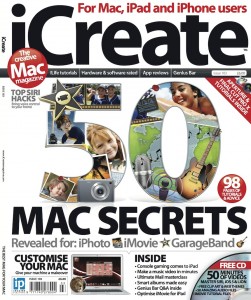 Good to see Imagine Publishing getting the year off to a cracking start with another feature-packed issue of iCreate magazine hitting the shelves this week. All the hours I put in before Christmas have resulted in a total of eight pages from me in this month’s issue. On page 40 you’ll find a 4-page mega-tutorial on how to use GarageBand to score your iMovie projects, while elsewhere in the issue I demonstrate how to customise the toolbar in Mac OS X’s Mail app and how to create your own Dashboard widgets using Safari webclips. All useful stuff, especially when combined with the brilliant cover feature detailing 50 secret tips for iLife. If you want to see more, get down to your newsagent or subscribe to the digital version via Newsstand.
More MacUser Column Inches
 Happy New Year everyone!
After a hugely enjoyable Christmas break for both me and my trusty MacBook, I’ve hit the ground running with a short contribution to the cover feature in the current issue of MacUser magazine. The feature deals with broadening your creative horizons by expanding your Mac skillset into other areas, such as video, CGI, photography, web design or app development. I was chuffed to be asked to contribute to the Music section, and you’ll find the results on page 48 of the 6th January 2012 issue.
The first working week of this year has also been taken up with work on an exciting 6-page feature for another upcoming MacUser issue – watch this space for more details later this month!
My iRig MIDI Review Reviewed!
 The review of IK Multimedia’s fabulous iRig MIDI that appears in this month’s issue of iCreate magazine has received its own mini-review on IK Multimedia’s news page. You can find out what I thought of the device by checking out the full news item at http://www.ikmultimedia.com/Main.html?MainPage.php (Clue: I kinda liked it!). Many thanks to Paul Kaufman at IK for putting the excerpts up on the site.
iTunes Match Now Available in the UK
 After making its debut earlier this year in the US, iTunes Match, the Apple iCloud service that promises to store your entire iTunes library (including music you’ve imported yourself from CD) in the Cloud and make it simultaneously accessible to all your Macs and iOS mobile devices, now appears to be accepting subscribers in the UK, along with several other countries including Canada, France, Spain, New Zealand, Australia, Ireland and Mexico. The option appeared on the front page of the UK iTunes Music Store overnight, showing a subscription price of £21.99 per year. As a bonus, if your originals are shoddy, low bit-rate mp3’s, iTunes will match them to 256Kbps DRM-free versions. Which is nice. Time to get uploading!
iCreate Issue 102 Now Available
 Issue 102 of iCreate magazine hits the shelves today, just in time for Christmas, haha. Unusually this month, I’ve been reviewing stuff rather than telling you how to use stuff. Page 120 is where you’ll find my comprehensive 2-page review of IK Multimedia’s astounding iRig MIDI. This is a proper MIDI interface for your iPhone, iPad and iPod Touch, if you can believe it. It’s the size of a Zippo lighter and means that you can hook up a full size MIDI keyboard to your iPhone, or swap things around and use your phone as a multi-touch MIDI controller. My last MIDI interface was a 19″ wide rackmounted unit, so I look upon this device with almost religious awe and wonderment.
Elsewhere in the issue, I get to have a play with Parallels Desktop 7 for Mac. Another amazing bit of kit, this allows you to fire up a virtual PC running Windows on your Mac, but does it so that you can switch and transfer files and data back and forth seamlessly between Windows and OS X applications, with no restarts required. After a while, you forget it’s there, it’s incredible technology. If you regularly need to access Windows software and documents but prefer using a Mac, this is your answer right here.
 daveclews.com