iCreate 112 Is Out!

iCreate 112 Is Out!

Issue 112 of iCreate hit the shelves at your local magazine boutique this week, and contained within its info-packed pages is a two-page tutorial from me on the basics of recording live instruments in GarageBand. Focussing on how to connect and configure external interfaces and microphones, setting levels, choosing monitor effects and finally recording takes, this guide should provide all the information you need to get a basic session off the ground when recording acoustic instruments with a microphone. The tutorial starts on page 48, and keep your eyes peeled for more from me in next month’s issue!


Computer Music 183 Out Now – Sample Your Surroundings, Write Memorable Melodies (With Video)

Computer Music 183 Out Now – Sample Your Surroundings, Write Memorable Melodies (With Video)

Issue 183 of Computer Music magazine hit the shelves this week, and nestling between its covers you’ll find not one, but two features from me this month.
On page 55 you’ll find a five-page guide to sampling the sort of everyday objects that you find lying around the house, to convert into unconventional musical instruments. With affordable, powerful audio workstations available to everyone these days, it’s never been easier to create your own sounds from scratch, and this guide shows you some easy ways to do it using a microphone, Logic and some of the amazing free plug-ins that are out there. So, if you want to record some coffee-tin percussion, make a one-octave wineglassophone or transform a grill-pan rack into a playable synth patch, it’s well worth a look. There’s also a page of tips to inspire you to create your own sounds from whatever else you can find to hand, from matchbox shakers to laundry-tub kick drums and more.
Following straight on from this, on page 60 you’ll find my feature on how to get things moving if you get stuck writing a melody. Kind of a sequel to the chord progression feature in last month’s issue, this tutorial illustrates a few reliable, theory-based techniques for taking melody lines in a new direction should you find yourself not knowing where to go next. Backed up with audio examples and another set of video tutorials produced and narrated by me, all of which can be found on the cover-mounted DVD, this four-page guide should hopefully supply you with some inspiring tricks that you can rely on time and time again.
Elsewhere in the issue, there’s the usual excellent mix of news, reviews and interviews, along with a big feature on unmixing and another massive batch of free samples and a free mix bus plug-in (Satson CM) on the DVD. Congratulations to the CM team on another great issue, which can be picked up from all good newsagents or downloaded as a digital version via Newsstand for iOS or Zinio for Mac and PC.

Avid Release Pro Tools 10.3, adds OS X Mountain Lion & Thunderbolt Compatibility

Avid Release Pro Tools 10.3, adds OS X Mountain Lion & Thunderbolt Compatibility

Avid have officially released Pro Tools version 10.3, which adds support both for OS X Mountain Lion and the newly-announced HD Native Thunderbolt interfaces, discussed in the earlier post below.

From Avid’s website:
Pro Tools Version 10.3 is an officially qualified and recommended installer for:

Pro Tools systems on Mac OS X 10.6.7 – 10.8 or Windows 7 SP1
Pro Tools|HDX systems on Mac OS X 10.7 – 10.8 or Windows 7 SP1
Pro Tools|HD Native systems on Mac OS X 10.6.7 – 10.8 or Windows 7 SP1
Pro Tools|HD Native Thunderbolt systems on Mac OS X 10.7.4 – 10.8 or Windows 7 SP1
Pro Tools|HD Accel systems on Mac OS X 10.6.7 – 10.8 or Windows 7 SP1

The website also mentions that, although this version of Pro Tools is now qualified for Mountain Lion, if you own a Mac Pro, it’s only officially supported on computers with Nehalem processors onwards. In other words, if your Mac Pro dates from earlier than March 2009, you’re outta luck.
Another caveat is that Pro Tools non-HD device drivers (such as drivers for M-Audio FireWire interfaces, Mbox 2, Mbox 2 Micro, Mbox 2 Mini, Mbox 2 Pro, & Pro Tools Mbox Mini) are not yet officially supported with Mountain Lion.

Pro Tools 10.3 is available for registered users to download from here.

Apple Unveils New iPods & New iTunes

Apple Unveils New iPods & New iTunes

Alongside the announcement yesterday of the iPhone 5, Apple also revealed a refreshed iPod lineup, together with new versions of the iconic iTunes software for both iOS 6 and OS X. The iOS 6 variant of the app has been completely redesigned, with improved performance and a different layout that allows you to preview while browsing. The desktop version also gets a makeover, due late October, that will feature a dramatically simplified, grid-based user interface, with easier playlist management and DJ-friendly ‘Coming Next’ feature. There’s also iCloud integration for remembering movie positions between devices, so you can start watching a film on your Mac or Apple TV and pick up later where you left off on your iPhone or iPad.

iPod Nano
The new, 7th generation iPod Nano is 38% thinner than its predecessor at just 5.4mm thick. It resembles a miniature iPod Touch, with a home button and 2.5″ multitouch display dominating Continue reading

iPhone 5 Breaks Cover

iPhone 5 Breaks Cover

Apple announced the long-awaited iPhone 5 at its media event at the Yerba Buena centre in San Francisco earlier today. With a case made entirely of glass and aluminium, the new iPhone is lighter and 18% thinner than before, measuring just 7.6mm thick. Touted as the world’s thinnest smartphone, it weighs in at just 112 grams, 20% lighter than the iPhone 4S. Its 4″ Retina display has an 1136 x 640 pixel resolution, which gives the screen room for an extra row of app icons at the top. All the factory apps have been optimized to show more stuff on the taller screen, including the iLife and iWork apps, while non-optimised apps run letterboxed, ie with black borders either side. There’s 44% more colour saturation, and the fact that the screen is taller whilst remaining the same width as before takes the screen closer to a 16:9 aspect ratio for better widescreen movie viewing.

There’s ultrafast wireless connectivity with LTE, which has a theoretical maximum of 100MBps, Continue reading

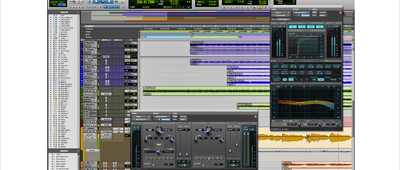
Avid Launch ProTools HD Native Thunderbolt Interface – but who for?

Avid Launch ProTools HD Native Thunderbolt Interface – but who for?

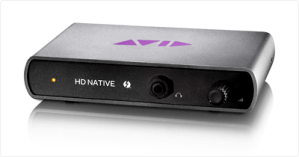
Avid, creators of the legendary Pro Tools audio recording, editing and mixing system, last week furthered their quest to eliminate the inherent latency of typical USB and FireWire audio interfaces by announcing a pair of new Pro Tools HD Native interfaces that take advantage of the ultra high-speed Thunderbolt connection standard found on the current crop of computers.
Don’t get too excited though, because even if you were able to purchase one of the new Thunderbolt interfaces, which come in either desktop box or PCIe core card format, as a single item, you’d still need to purchase an additional Pro Tools HD I/O audio interface to hook it up to. As it is, you can only buy them as part of a bundle – the new ‘interfaces’ do not have any audio in or out connections themselves, they’re just bridging devices, a means of utilising the speed of the data throughput of the Thunderbolt port on current computers, in preference to latency-prone USB and FireWire ports. This means that the price of the cheapest available bundle, consisting of Thunderbolt interface, Pro Tools 10 software and compatible HD OMNI audio interface, comes out at a whopping $4999USD (around £3300GBP).

UK Pricing:

Pro Tools|HD Native + HD OMNI System £3,299.00 (£3,958.80 inc. VAT)
Pro Tools|HD Native + HD I/O 8x8x8 System £3,999.00 (£4,798.80 inc. VAT)
Pro Tools|HD Native + HD I/O 16×16 Analog System £4,599.00 (£5,518.80inc. VAT)
Pro Tools|HD Native + HD MADI System £4,599.00 (£5,518.80 inc. VAT)
Mbox Family / 00x to HD|Native + HD OMNI Exchange £2,599.00 (£3,118.80 inc. VAT)

For the moment at least, Avid are not offering the unit on its own to accommodate the needs of Continue reading

Sony Officially Announce Sound Forge Pro Mac 1.0

Sony Officially Announce Sound Forge Pro Mac 1.0

As mentioned in an earlier post, there has been a teaser campaign running for several weeks now at www.finallyonthemac.com, heralding the imminent arrival of an OS X version of Sony’s Sound Forge Pro audio recording, editing and mastering software. Well, the day has arrived – Sony Creative Software officially announced today that Sound Forge Pro v1.0 for Mac will be available later this month at a suggested retail price of $299USD.

From the press release:
“People who work on audio editing platforms recognize the need for a fresh option in the marketplace, one that’s built for OS X as Continue reading

MacUser Vol. 28 No. 18 – OS X’s Hidden Helpers.  I made the front cover!!

MacUser Vol. 28 No. 18 – OS X’s Hidden Helpers. I made the front cover!!

Excuse my excitement (and the accompanying double exclamation marks), but it’s not every day that a feature you’ve conceived, written and illustrated becomes the main cover feature of one of the UK’s most eminent computer magazines.

Shining the spotlight on the hidden apps lurking in your Mac’s Utilities folder, this eight-page feature is the latest, and hopefully not the last, in a slow-yet-steady stream of pieces I’ve had published in MacUser over the last year or so, but this is the first time one of my articles has been featured so prominently. Hopefully people will find it useful, as I know that I for one, prior to researching the piece, had no clue what the majority of the apps in this folder were for, and there is some really quite useful stuff in there. It goes without saying that all the information in the piece is bang up to date and Mountain-Lion savvy, outlining any major changes implemented with the new operating system in any of the applications covered.

To discover the secrets that lie within, pick up a copy from Smiths or download it to your iDevice, Mac or PC via Zinio. Be quick though – MacUser is published every two weeks, so this issue will only be around for another few days! The article begins on p.56, and I have to take this opportunity to say a huge thanks to Adam and the MacUser team for making it look so good.